
From: https://lyvba.com/index.php/2023/08/12/linux-image-4-19-0-18-cloud-amd64/
一、更新package
|
1 |
apt update -y && apt dist-upgrade -y |
二、查看系统现有内核
|
1 2 3 4 5 |
dpkg -l|grep linux-image ii linux-image-6.1.0-11-amd64 6.1.38-4 amd64 Linux 6.1 for 64-bit PCs (signed) ii linux-image-6.1.0-9-amd64 6.1.27-1 amd64 Linux 6.1 for 64-bit PCs (signed) ii linux-image-amd64 6.1.38-4 amd64 Linux for 64-bit PCs (meta-package) |
三、查看最新 cloud 内核
|
1 2 3 |
apt-cache search linux-image | grep cloud linux-image-6.1.0-11-cloud-amd64 - Linux 6.1 for x86-64 cloud (signed) |
四、安装Cloud内核
|
1 |
apt install linux-image-6.1.0-11-cloud-amd64 -y |
五、更新grub
|
1 |
update-grub |
六、重启
|
1 |
reboot |
七、验证是否成功
|
1 2 3 |
uname -r 6.1.0-11-cloud-amd64 |
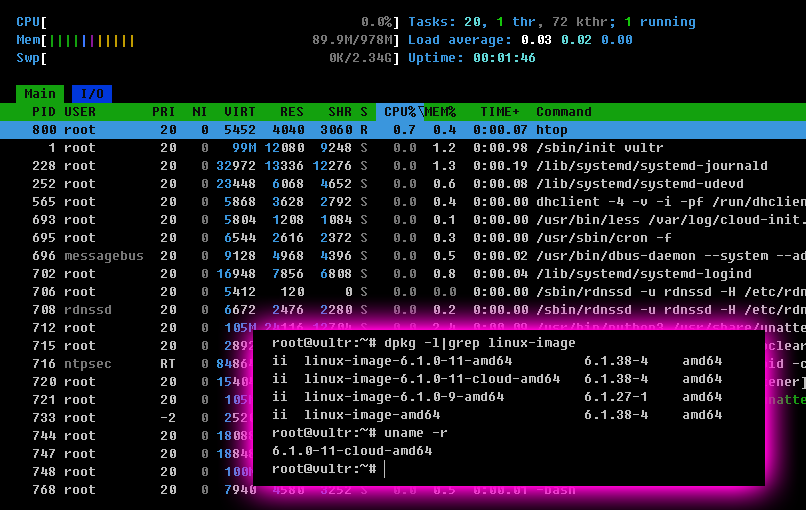
八、使用 htop 查看内存占用,别原来的内核可以少使用 18M 内存
- 卸载老内核,释放空间
123apt remove linux-image-6.1.0-9-amd64 linux-image-6.1.0-9-amd64linux-headers-6.1.0-9-amd64 linux-headers-6.1.0-9-amd64apt autoremove - 提示信息,可以释放不少硬盘空间
1234567Use 'apt autoremove' to remove it.The following packages will be REMOVED:linux-headers-6.1.0-9-amd64 linux-image-6.1.0-9-amd640 upgraded, 0 newly installed, 2 to remove and 0 not upgraded.After this operation, 411 MB disk space will be freed.Do you want to continue? [Y/n] yAfter this operation, 57.5 MB disk space will be freed.